
Voter ID Apply Online & Download e-EPIC: Complete Step-by-Step Guide 2026
Learn how to apply for a new Voter ID online, download your digital e-EPIC, correct voter details, replace an EPIC, and access voter services through the official Election Commission of India portal.
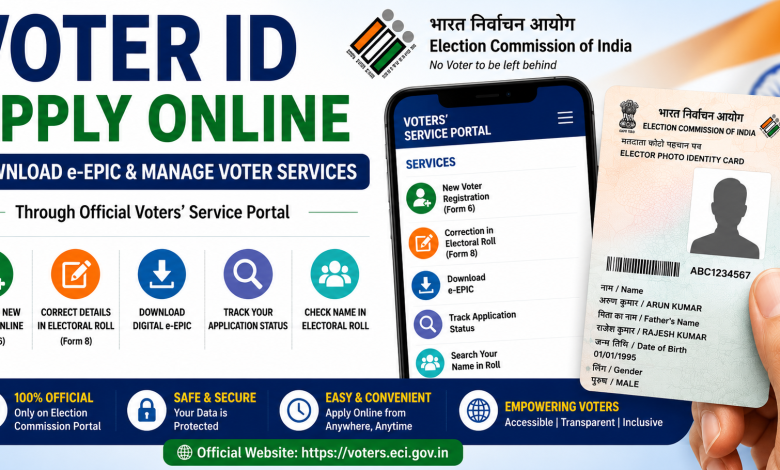
A Voter ID Card, also known as an EPIC (Elector Photo Identity Card), is issued to registered electors in India. The Election Commission of India provides online voter services through its official Voters’ Services Portal, where eligible citizens can apply for voter registration, manage electoral-roll details, track applications and access e-EPIC services.

This guide explains how to apply for a Voter ID online, download an e-EPIC, correct voter details, replace an EPIC and check voter-related information online.
Important: Always use the official Election Commission of India portal for voter services. Never share your OTP or sensitive personal information with unknown websites or individuals.
What is a Voter ID or EPIC?
EPIC stands for Elector Photo Identity Card. It is issued to registered electors and serves as an identification document associated with a person’s electoral registration.
The e-EPIC is the digital version of the EPIC that eligible registered electors can access through the Election Commission’s online voter services. The Voters’ Services Portal also provides facilities for new voter registration, correction of electoral-roll entries, replacement of EPIC and other voter-related services.
Official Voter ID Online Portal
The primary online portal for voter services is operated by the Election Commission of India.
Official Voters’ Services Portal:
Voters’ Services Portal – Election Commission of India
Through this portal, users can access services including new voter registration, electoral-roll corrections, application tracking and other voter-related facilities.
How to Apply for a New Voter ID Online
Eligible Indian citizens seeking registration as a new voter can submit Form 6. The official Voters’ Services Portal identifies Form 6 as the application for new voter registration.
The general online process is:
- Visit the official Voters’ Services Portal.
- Sign up or log in to your account.
- Select the option for New Voter Registration – Form 6.
- Enter the required personal and electoral details.
- Provide your address and other requested information.
- Upload or provide the required supporting documents as instructed.
- Review the information carefully.
- Submit the application.
- Save the application/reference details for tracking.
The exact fields and document requirements shown on the portal should be followed at the time of application.
Apply for New Voter Registration:
Access Voter Registration Forms
What is Form 6?
Form 6 is the application form used for new voter registration. The official Election Commission portal provides Form 6 and guidelines for applicants.
Applicants should provide accurate information and ensure that their supporting documents meet the requirements specified in the latest Form 6 guidelines.
Official Form 6:
Download Form 6 for New Voters
How to Create an Account on the Voters’ Services Portal
To access online services that require authentication, visit the portal and use the sign-up option if you do not already have an account.
The portal’s login page supports login using registered credentials such as a mobile number, email ID or EPIC number, followed by captcha and OTP verification as applicable.
Account Registration:
Sign Up on Voters’ Services Portal
Existing Users:
Login to Voters’ Services Portal
How to Download Voter ID or e-EPIC Online
The Election Commission lists e-EPIC download among the services available through its Voters’ Services Portal.
To access your e-EPIC, the typical process is to visit the official portal, log in to your account, locate the available e-EPIC download service, provide or confirm the requested details and complete any authentication steps shown by the portal.
Once the system confirms eligibility and verification, follow the on-screen instructions to access the available digital EPIC.
Because portal features and authentication requirements can change, users should follow the current instructions displayed on the official ECI portal.
Official Portal:
Download e-EPIC via Voters’ Services Portal
How to Correct Details on Voter ID
If your electoral-roll or Voter ID details contain an error, you can use Form 8 for applicable corrections.
The Election Commission lists Form 8 for services including shifting of residence, correction of entries in the existing electoral roll, replacement of EPIC and marking of PwD.
Depending on your requirement, you can select the relevant option and submit the requested information and supporting documents.
Voter ID Correction – Form 8:
Access Form 8 Online
What If I Have Changed My Address?
If you have shifted your residence, the Election Commission’s voter services guidance directs electors to use Form 8 for shifting their electoral-roll entry. The application can be submitted online or to the Electoral Registration Officer concerned, as applicable.
Make sure you provide your current residential details and any supporting documents requested during the application process.
How to Replace a Voter ID / EPIC
Form 8 also covers applications for replacement of EPIC. If you need a replacement, access Form 8 through the official portal and select the appropriate service.
Follow the instructions displayed on the portal and submit the required details.
How to Check Your Name in the Electoral Roll
Before an election, it is important to confirm that your name appears in the current electoral roll. Having a Voter ID card alone should not be treated as a substitute for checking your current electoral-roll registration.
The Election Commission provides online voter search facilities, and its guidance states that electors can check their enrolment in the electoral roll online.
You can start from the official Voters’ Services Portal to access the appropriate voter search service.
Check Voter Services and Electoral Registration
How to Download the Electoral Roll
The Election Commission also provides an online Electoral Roll download facility. Users can select details such as the relevant state and year of revision, subject to the options currently available on the portal.
Official Electoral Roll Service:
Download Electoral Roll
Forms Available for Voter Services
Different forms are used for different electoral services. Form 6 is for new voter registration, Form 6A is for eligible overseas Indian electors, Form 7 deals with deletion or objection regarding inclusion in the electoral roll, and Form 8 covers shifting, corrections, EPIC replacement and marking of PwD.
Applicants should select the form that matches their specific requirement rather than submitting multiple forms for the same request.
Official Election Forms:
View and Download ECI Voter Forms
Frequently Asked Questions (FAQs)
Can I apply for a Voter ID online?
Yes. The Election Commission’s Voters’ Services Portal provides online access to new voter registration through Form 6.
Which form is required for a new Voter ID?
New voter registration is handled through Form 6 for eligible applicants.
Can I download my Voter ID online?
The Election Commission’s Voters’ Services Portal provides an e-EPIC download service for eligible registered electors. Follow the current authentication and download instructions displayed on the official portal.
How can I correct my name or other Voter ID details?
For applicable corrections to entries in the electoral roll, use Form 8 through the Election Commission’s voter services system.
Which form should I use if I change my address?
The Election Commission’s guidance specifies Form 8 for shifting an electoral-roll entry when an elector changes residence.
Can I get a replacement EPIC?
Yes. Replacement of EPIC is one of the services covered under Form 8.
Conclusion
The Election Commission of India’s online voter services make it easier to manage several voter-related tasks from one portal. Eligible citizens can use Form 6 for new voter registration, while existing electors can use Form 8 for applicable corrections, shifting of residence and EPIC replacement. Registered electors can also access e-EPIC and other voter services through the official portal.
For security and accurate information, always use the official Election Commission of India portal and carefully verify the details you enter before submitting an application.
Official Website:
Voters’ Services Portal – Election Commission of India